Embed String Warrior widgets

Put a live chord diagram, a set of chords, the fretboard explorer, or a chord-progression player on your own site, blog, or lesson page — with a single <iframe>. Free, no signup, and every widget carries a link back here. Grab any snippet below and paste it into your page.

Every widget is a small page under stringwarrior.com/embed/… that you frame on your site. They match your chosen colour theme, resize to fit, and set no cookies or trackers inside your page. To build a link for an exact chord, tuning, or progression, open the matching tool, set it up, and copy the address — then swap /guitar/chords/… for /embed/chord/… as shown below.

Single chord diagram

One interactive chord chart — pick the instrument, note, and chord type in the path. Add /0, /1, … to show a specific voicing instead of the default open shape.

<iframe
  src="https://stringwarrior.com/embed/chord/guitar/c/major"
  title="C major chord — String Warrior"
  width="340" height="300" loading="lazy"
  style="border:0;max-width:100%"
  sandbox="allow-scripts allow-popups allow-popups-to-escape-sandbox allow-same-origin">
</iframe>

Path: /embed/chord/{instrument}/{note}/{type}[/{voicing}]. Browse shapes on the chord library.

A set of chords

Show several chords together — a song's chords, a key's family, or a shape you're teaching. List them in chords= (dash-separated, sharps as s, e.g. Cs). Choose the shape with layout=: row (a left-to-right strip), grid, or column.

<iframe
  src="https://stringwarrior.com/embed/chords/guitar?chords=C-Am-F-G&layout=row"
  title="Chords: C Am F G — String Warrior"
  width="100%" height="300" loading="lazy"
  style="border:0"
  sandbox="allow-scripts allow-popups allow-popups-to-escape-sandbox allow-same-origin">
</iframe>

Path: /embed/chords/{instrument}?chords=Am-C-G&layout=grid|row|column.

Fretboard explorer

The full interactive fretboard — visitors tap notes or frets and every matching spot lights up in its own colour. Pre-select notes with notes=, pin positions with pos=, or set an alternate tuning=.

<iframe
  src="https://stringwarrior.com/embed/fretboard/guitar?notes=c,e,g"
  title="Guitar fretboard explorer — String Warrior"
  width="100%" height="520" loading="lazy"
  style="border:0"
  sandbox="allow-scripts allow-popups allow-popups-to-escape-sandbox allow-same-origin">
</iframe>

Path: /embed/fretboard/{instrument}?notes=c,e,g&pos=s1f0-s2f1&tuning=drop-d. Set it up on the fretboard explorer and copy its address.

Chord progression

A read-only progression view with per-chord diagrams, key and transition info, and tap-to-play playback. Build one in the progression builder, share it, and swap the share link's path for /embed/progression.

<iframe
  src="https://stringwarrior.com/embed/progression?instrument=guitar&key=C&mode=major&chords=C-Am-F-G"
  title="C Am F G progression — String Warrior"
  width="100%" height="560" loading="lazy"
  style="border:0"
  sandbox="allow-scripts allow-popups allow-popups-to-escape-sandbox allow-same-origin">
</iframe>

Path: /embed/progression?instrument=guitar&key=C&mode=major&chords=C-Am-F-G. Playback starts on a click (nothing autoplays).

Metronome

A full metronome — tempo, tap tempo, time signature, accent, and every click sound, including a spoken count, a silent visual-only mode, and haptic vibrate on phones. Nothing plays until the visitor presses Start.

<iframe
  src="https://stringwarrior.com/embed/metronome"
  title="Metronome — String Warrior"
  width="100%" height="360" loading="lazy"
  style="border:0;max-width:40rem"
  sandbox="allow-scripts allow-popups allow-popups-to-escape-sandbox allow-same-origin">
</iframe>

Path: /embed/metronome. The full tool lives on the metronome page.

Tuner

The microphone tuner for every instrument on the site, with alternate tunings and optional spoken note names. Add allow="microphone" so the mic prompt can appear inside the frame; without it the pickers and readout still work.

<iframe
  src="https://stringwarrior.com/embed/tuner"
  title="Tuner — String Warrior"
  width="100%" height="440" loading="lazy"
  style="border:0;max-width:40rem"
  allow="microphone"
  sandbox="allow-scripts allow-popups allow-popups-to-escape-sandbox allow-same-origin">
</iframe>

Path: /embed/tuner?instrument=guitar preselects an instrument. The full tool is on the tuner page.

Make it fit its content (optional)

Each widget knows its own height and reports it to your page. A fixed height works fine on its own, but if you want the iframe to grow and shrink with the content, add origin and id to the URL and drop this listener on your page once:

<iframe
  src="https://stringwarrior.com/embed/chord/guitar/c/major?origin=https://YOURSITE.com&id=sw1"
  data-sw-embed="sw1" title="C major chord — String Warrior"
  width="340" height="300" loading="lazy" style="border:0;max-width:100%"
  sandbox="allow-scripts allow-popups allow-popups-to-escape-sandbox allow-same-origin"></iframe>
<script>
  window.addEventListener('message', function (e) {
    if (e.origin !== 'https://stringwarrior.com') return;
    var d = e.data;
    if (!d || d.type !== 'stringwarrior:embed:size') return;
    var f = document.querySelector('[data-sw-embed="' + d.id + '"]');
    if (f) f.style.height = d.height + 'px';
  });
</script>

Set origin to your own site's URL and give each embed a unique id if you have more than one on a page.

As a plain image — no iframe (chords)

Every chord also renders as a self-contained SVG image, so you can drop it in anywhere an <img> works — a Markdown README, a forum post, an email, or a platform that strips iframes and scripts. It stays crisp at any size and carries a text description for screen readers. Available for guitar, ukulele, mandolin, and bass.
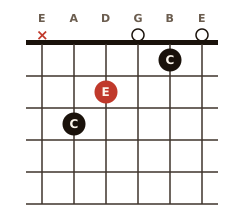
C major chord diagram
<img
  src="https://stringwarrior.com/images/diagrams/guitar/c/major.svg"
  alt="C major chord"
  width="226" loading="lazy">

In Markdown: ![C major](https://stringwarrior.com/images/diagrams/guitar/c/major.svg)

Path: /images/diagrams/{instrument}/{note}/{type}.svg — instrument is guitar, ukulele, mandolin, or bass; sharps are written s (e.g. cs for C#), and the type matches the chord library (major, m7, dom7, …).

One-line embed & auto-embed

Don't want to hand-write an iframe? Drop a placeholder and our tiny loader script once — it builds the iframe, matches the theme, and wires the auto-resize for you. One script tag handles any number of embeds on the page.

<div class="stringwarrior-embed" data-embed="chord/guitar/c/major" data-theme="whetstone"></div>
<script src="https://stringwarrior.com/embed.js" async></script>

data-embed is the path after /embed/ — e.g. tuner, metronome, or chords/guitar?chords=C-Am-F-G&layout=row. Optional: data-theme, data-title, data-width, data-height. For embeds added after load, call window.StringWarriorEmbed.load().

Publishing on WordPress or another platform that supports oEmbed? Paste a plain tuner or metronome URL and it auto-embeds — those pages advertise an oEmbed endpoint (/api/oembed?url=…) that consumers pick up automatically.

Options

Add these to any embed URL as query parameters (?theme=whetstone&layout=row):

Parameter What it does
themeColour palette. One of the 23 site themes (e.g. ember, forest, cyber, midnight, royal, parchment) or ninja for the classic look. Defaults to Ember.
layoutChord-set only: row (horizontal strip), grid (wraps to fit), or column.
modeChord diagrams: fingers (default), shape, or notes — what the dots show.
origin, idUsed by the resize listener above: your site's URL and a unique id per embed.

Good to know

Is it free? Do I need an account?
Yes, it's free, and there's no signup or API key. The widget output and the chord-diagram SVGs are published under CC BY 4.0: you may embed, copy, adapt and republish them, commercially included, provided you keep the credit. Each widget already renders a small "String Warrior" link — that link is the credit, so leaving it visible is all the condition asks of you. Full terms, and the surfaces they don't cover, are on our content licence page.
Does it track my visitors or set cookies?
No. The embed pages carry no analytics and set no cookies inside your page, so they won't interfere with your own privacy or consent tooling.
Will it work in WordPress, Notion, or a plain HTML page?
Anywhere that allows an <iframe>. Paste the snippet into an HTML/embed block. Some hosted platforms strip iframes on lower plans — for those, use the plain <img> SVG version above (chords, no iframe or script; works in Markdown and email too).
How do I build a link for a specific chord or progression?
Open the matching tool (chords, fretboard explorer, or the progression builder), set it up, and copy its address — then change the path to the matching /embed/… form shown above. The parameters are the same.
Why does the widget look boxed off / how do I match my site?
Set theme to the palette closest to your site. The widget fills the width you give the iframe and reports its height back (see the resize listener), so give it a sensible width and either a fixed height or the listener.

Teaching with these? The For teachers page pulls together the printables, embeds, and accessible tools for classrooms.

← All tools
